Showing posts with label online. Show all posts

Tuesday, October 19, 2021

Premium Subscription from LightSail for Homeschoolers: A TOS Crew Review

Disclosure: I received this complimentary product through the Homeschool Review Crew


LightSail for Homeschoolers


Premium Subscription  from LightSail for Homeschoolers


Premium Subscription 
from LightSail for Homeschoolers is an online subscription to help build 
reading, writing, vocabulary, and fluency skills for grades PreK-12.

LightSail for Homeschoolers Library gives you access to over:
  • 12,000 books - including 3,500 classics and many faith-based titles 
  • Over 50,000 World Book Encyclopedia Articles with Maps, Atlases & Timelines
  • Lerner Sports Encyclopedia
  • Audio Books - over 13,000 titles including - standard audiobooks, audiobooks with text highlighting by word, and audiobooks with text highlighting by sentence
  • 360 degree Images
  • Videos
  • Augmented Reality
  • Livestreams 


It's truly a complete digital library that you can access anytime (with no overdue fees!) In addition, this program is designed specifically for homeschoolers with lessons in readingwritingvocabulary, and fluency skills built in.


The ability to track reading minutes, use bookmarks, highlight quotations, and create memory lists are just a few more nifty features designed with homeschooling in mind.

Students are given an assessment as they begin to accurately determine their Lexile reading level.  This helps determine the books and assignments.  "Power Texts" are at the student's reading level, and are the tool for helping increase readingwritingvocabulary, and fluency skills with educational features like fill-in-the-blank assessments to check reading comprehension, a full dictionary, read-aloud ability, related content while tracking reading minutes and offering incentives.

All student reading is overseen through the parental control features that let parents monitor and control content, assessments, media, features, chats, and more.


We are HUGE book lovers and were excited to see what LightSail has to offer.  With multiple children using this program, it was easy to find tons of great content, they can even read the same titles, and participate in a family chat or answer challenge questions.


Since we do love a good book with actual pages to turn, while cuddled up together, and my kiddos are all proficient readers - we focused mainly on all the great ways to use Lightsail, other than tracking reading minutes and building literacy skills, which this program is great at with an adaptive platform that customizes to your child's reading level! 

They have an entire library of interesting things to discover.  Like the World Book maps and timelines to go with our history studies.


The 360 degree images that really wowed us - visiting the Sistine Chapel or the inside of the airplane cockpit!
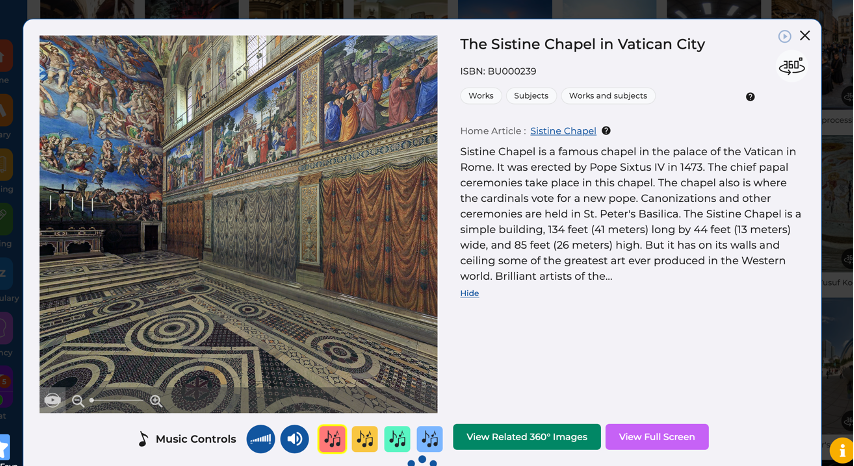


The Lightsail library is interconnected, so frequently related images, books, and articles are just a click away.


Their Video section is jam-packed too!  You can check out videos from a wide range of subjects, but our favorite has to be the Ted Ed talks...or maybe the Livestreams...


Who doesn't love a good Unit Study to spice things up?  Lightsail has over 150 to choose from - fully integrated with books, encyclopedia articles, videos, or any other multimedia content designed by homeschool moms, for homeschool moms.


The Library collections are impressive, you can pick from dozens of genres and thousands of titles.  Handy search features help you find books customized to your child's reading level as well.  I appreciate that they also have faith-based titles and an impressive collection of classics (especially after seeing some of the "Most Popular" reads... making me thankful for the ability to control the reading material options for my children!)


There is SO MUCH to this program, I feel like we will be unpacking all the treasures for a good time to come.  Best of all... it's easy to take on the go with you.  


Find LightSail for Homeschoolers on Social Media:


Facebook: https://www.facebook.com/LightSailEd
Instagram: https://www.instagram.com/lightsailed/

Hashtags: #hsreviews #homeschool #homeschooling #reading #ebooks #edtech #elearning


                  Improve Reading Skills with LightSail for Homeschoolers

Thursday, September 23, 2021

Reading Eggs and Mathseeds from Reading Eggs: A TOS Crew Review

Disclosure: I received this complimentary product through the Homeschool Review Crew


         Reading Eggs


Reading Eggs and Mathseeds from Reading Eggs


Reading Eggs and Mathseeds from Reading Eggs is a  great way to keep those reading skills sharp for students ages 2-13! We have been using this program for years.    This program works on your computer, laptop, tablet or on your mobile device with their new app.

The online, yearly subscription includes access for up to 4 students to:

Reading Eggs Junior is designed for your preschoolers - ages 2-4. It uses a variety of read-aloud books, alphabet games and more to get your child focusing on letters and the sounds they make.

Reading Eggs is for ages 3-7, uses a self-paced program to get your children excited about reading. They can complete a variety of activities and earn golden eggs as a reward!

MathSeeds is a great program for ages 3-9 to practice and perfect math skills with over 200 lessons, printable worksheets, and fun rewards. 

Reading Eggspress helps ages 7-13 with practice for their reading skills. A simple placement test helps put them in the correct spot.The program is full of games, activities, online books and more that help your child learn to love reading. This is where my tester has been.
 
Fast Phonics is for your 5-10 year olds. It's packed with games and levels to keep your new readers engaged by practicing systematic phonics! 

Mental Minute Drills - designed to practice and master essential math skills of addition, subtraction, multiplication, and division.This program is based on solid research and focuses on building essential reading skills through phonics, sight words, spelling, vocabulary and comprehension. But, it's so fun - they had no idea they were really learning!


My student has her own dashboard.  She can choose to practice skills like spelling, play games and compete against others, complete lessons to earn golden eggs (the reward!), visit the library, see her targets, play games in the arcade or even go "shopping" at the mall.


and,  I get detailed progress reports on what she is working on.


My tester has been using the program for the past several years, and loves it!  Her lessons are arranged on a "map" that she works through that corresponds to the book she chooses.


A lesson for them covers several key reading skills. There are several different sections that focus on different skills for reading:


  • Cover Story - they answer questions about the cover of their book. 
  • Dictionary lets them learn new vocabulary with dictionary practices.
  • Fact or Opinion practices recognizing the difference as they read.
  • Main Idea & Details and Making Inferences helps them identify key sentences and learn to make inferences from what they are reading. The program offers immediate feedback on answers.
  • Words in Context helps pinpoint how words are being used.
  • Reading allows them to read directly from an interactive book. They have plenty of great books to choose from.
  • The Quiz checks how much they remember. They need to score a minimum level to advance to the next step on their map.


After each section is completed, she earns gold "eggs".  These are the currency of the program.  The eggs can be used to play games, or go shopping!  Of course, this is my tester's favorite part.  She loves to decorate her apartment, collect pets & change her avatar...


I've been impressed with the depth of the content on Reading Eggs and my testers have loved it. 


I recommend checking them out with the FREE 30 day trial to see for yourself!


Find Reading Eggs on Social Media:

Facebook: https://www.facebook.com/readingeggsUSCATwitter: https://twitter.com/readingeggs
Instagram: https://www.instagram.com/readingeggs/YouTube:https://www.youtube.com/channel/UC8ED-7e2xA3fxgrM7Wq2XGQ

Hashtags: #hsreviews #learntoread #readingeggs    


                  Learn to Read with Reading Eggs

Tuesday, June 29, 2021

Words Rock Online from EdAlive: A TOS Crew Review

                                EdAlive


Disclosure: I received this complimentary product through the Homeschool Review Crew


Words Rock Online from EdAlive


Summer is a great time to sneak in some learning that looks more like a video game!  Words Rock Online from EdAlive is an online, adaptive learning program designed to help your students (ages 5-15) with core literacy skills like vocabulary, spelling, grammar, punctuation and pre-literacy in a fun game-like environment.

Parents login first and set up student user accounts.  The program will work on any internet ready device - tablets, computers and smartphones - you can take it on the go!

Students can choose to play a multi-player, Battleship-type game to capture slugs and earn points. The program is an adaptive learning format, that means it records and adjusts the difficulty of questions to each student.  Players can choose quick games against other players or against the computer. My testers really didn't like the game - it seemed to take too long for the turns, and they quickly tired of it.


My students preferred to choose the "Questions Only" option.  In this mode, students are asked a WIDE variety of language questions including vocabulary, spelling, grammar and punctuation.


The questions are varied, with an option to choose "Too Hard" if the question is above their level.

What my students enjoyed most was the variety.  Some questions have them typing in the answer, some moving the boxed word and other variations. Here's a peek at some of the questions:


At first the questions were easy for them, but the adaptive learning function adjusted questions to more and more difficult questions.  Each question allows the student the opportunity to attempt to answer twice before displaying the correct answer.  


This one even stumped me!

The questions cover spelling, vocabulary, grammar & punctuation and advanced grammar questions.  You can also choose the "all content" option and have all types of questions in a random order. It's a fun way to review and keep those skills sharp over the summer.


Each question is presented in a fun, cartoon illustrated way.


Spelling exercises are included too...


These type of questions were great for developing careful reading and details!


The parent account lets you see detailed results so you can know what needs some more attention, and which skills are mastered.


The program is not comprehensive enough to teach the skills, but it can be a fun way to sneak in some review.


Be sure to check out the other products from EdAlive    


Find EdAlive on Social Media:


Hashtags: #hsreview #wordsrock #vocabularygames #wordgame #grammarlearning #vocabularyenglish #vocabularylearning #wordgames #wordskills #readingsoftware #vocabularyinenglish #wordpower #phonicsisfun #phonicsactivities


        Online Math, Reading, and Language Arts with EdAlive

Tuesday, April 27, 2021

Teaching Textbooks Math 4.0 From Teaching Textbooks: A TOS Crew Review

Teaching Textbooks Reviews


Disclosure: I received this complimentary product through the Homeschool Review Crew


Teaching Textbooks Math 4.0 from Teaching Textbooks


I have never been a fan of teaching math, and for YEARS Teaching Textbooks has been our "go to" math curriculum for all levels. The new version -  Teaching Textbooks Math 4.0 has made it even better!

Teaching Textbooks Math 4.0 is app-based subscription that is able to be used on most any device, including smartphones and tablets.  This program is designed with homeschooling families in mind and contains full, comprehensive math curriculum (grades 3- Pre-Calculus).  Lessons contain audiovisual teaching and explanations, lectures, quizzes and automated grading for a 12 month period.  All you have to do is download it and let your child start learning!

We have been using Teaching Textbooks for many years and we love their product.  My students are able to work independently, and all my graduates have earned college math credit on their ACT scores after using Teaching Textbooks exclusively during high school.  

The Teaching Textbooks Math 4.0  contains all the great content and lessons from previous versions, with some nice upgrades.  Here's a few:
  • You can enroll your entire family, and use the app feature across multiple devices.  This was a HUGE upgrade for my family, since we all share laptops, tablets, and phones.  The app can be installed, and the student data is stored on servers, so it's available from device to device.  
  • They offer a great deal for families with 4-8 children - we used the family subscription for 5 students: Math 7, Pre-Algebra, Algebra 2 and 2 students in Geometry during this time.  Each student has their own login and parents have their own login for the parent portal.


  • The scratch pad is a nice addition as a place for them to do their scratch work.  We travel a lot more now that we are in CA and TX, so having a fully "on the go" curriculum has been great. It's designed to work best on a tablet and is not as "mouse friendly" when using a laptop or desktop.
  • Students can customize screen wallpapers, animated buddies, and sounds.  My younger students really enjoy this feature!


  • The 4.0 version appears on screen in a book-type format that my testers perfer.  It's super user friendly and intuitive.  When a student logs in, the program takes them right to the place they left off.

  • You can pause lessons for up to 3 months (90 days) whenever you want to with just one click.  This is a nice feature if you plan on taking any extended breaks or even mini-math vacations.


  • Life time access to your student's grade book. Another great feature if you have multiple children - it's easy to keep up with their work and progress.


  • Check out the free 15 day trial to see for yourself - you can try any level you want, and all their grades will transfer in, if you decide to upgrade to a full subscription. Not sure where to start? Have your student take the free placement test to find out!
Here's some other features we like about Teaching Textbooks:

I'm not in charge of math any more, my students are.  I can't tell you how many arguments this has prevented, but it has also encouraged my student's independence and motivation!


The 4.0 app contains printable PDF copies of the lessons - a nice feature if you want to work offline (but you certainly do NOT have to print them) and full answer keys with my Parent Login.


Immediate feedback is given for answers (hints can be included).  My students have greatly improved using the 4.0 app version over our old method of pen/paper.  When an answer is incorrect, they immediately know and can try again for the correct answer or see the problem worked out step-by-step. (notice her cute wallpaper?  She changes it daily! 😂)


I also appreciate the Parent Portal information being easy to find and use.  I can manage settings like hints and second chances, and see their progress any time I want to.


Teaching Textbooks customer service is hands down, THE BEST!  We have used this product for years and every interaction has been positive - they answer the phone, and quickly answer your questions.
I just learned that they even offer free math tutoring help over the phone as part of your subscription.

I highly recommend Teaching Textbooks Math 4.0  as our favorite math program ever!